Disclaimer
This post is for informational purposes only. All mentions of web-browsers and the network traffic caused by them is meant to be neutral and descriptive.
Ultimately your web browser choice is subjective and heavily dependent on your individual needs. (PLEASE DON'T COME AFTER ME MOZILLA AND GOOGLE)
Summary Of Findings (TLDR)
The core of this blog post is me routing browser traffic on a VM through a MITMProxy and going through the network traffic manually.
Firefox:
- On launch, my literal latitude and longitude were immediately identified by Mozilla
- Even after disabling telemetry there are still some GET requests that are forwarded to Mozilla.
Chrome:
- Sends a lot of data to "depreciated" endpoints
- Notified Google that I was forwarding data to through a Proxy
- Even after disabling settings, data is still sent to random endpoints.
Chromium:
- On first launch slightly less network requests are made than regular Chrome
- Still reach out to a lot of Google Services
Ungoogled Chromium:
- Best Chromium fork IMO
- Disables all Google functionality
- No network requests upon launch/idle/tab-manage
LibreWolf:
- Firefox fork with maximum security settings enabled by default.
- Not too many requests going to Mozilla (Only addons & Certificate/Block lists)
- No standby/new tab network requests being generated
Pale Moon:
- Solid option in terms of privacy
- UI a bit on the worse side IMO
- Good privacy/security settings
Full investigation
As time progresses and technology makes STRIDES whether that is due to insanely intelligent open-source efforts made by people or artificial intelligence consuming more and more data on the web,
It does not change the ultimate fact that algorithms constructed by big corporations that have been built with the sole purpose of consuming every possible bit of data that an end-user produces in order to sell it for money, or fine-tune their dynamic pricing strategies in order to make more PROFIT (For examples Uber's commonly known Surge Pricing strategy that takes advantage of low batteries & weather conditions in the area IE higher price if its raining)
In terms of day-by-day activity anyone who needs to use the internet needs to do it through a medium, the most common application level medium is a web-browser. I've noticed among my close-circles of peers who are in IT, there doesn't seem to be any awareness at all from their side on the amount of data accessible by their browser.
They are usually under the belief that as-long as they are browsing the web with a VPN they are fine...... Well sadly that's not the case.
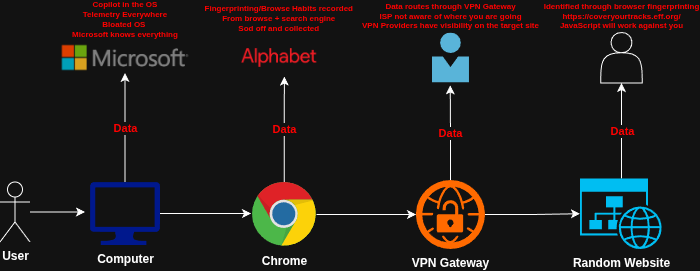 The same way Defense In Depth is important in an Enterprise, it is critical for end-users to evaluate their current OS/Application level setup for day-by-day usage, being fully aware on how their data is flowing.
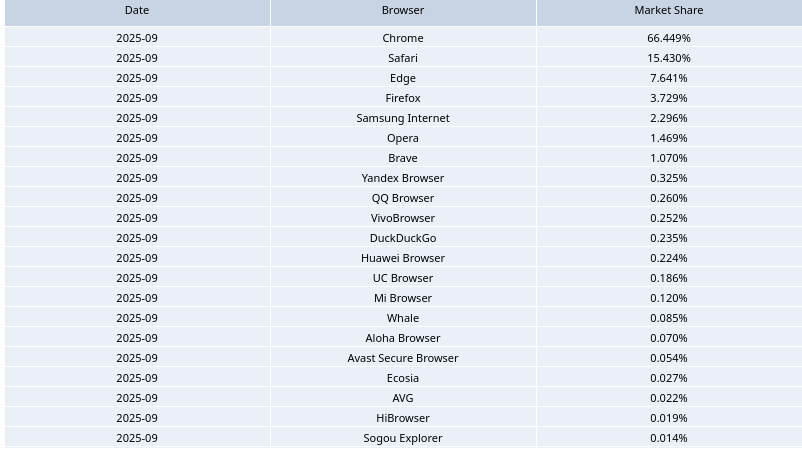
The Browser Market Share Report for 2025 (Q3) by CloudFlare showcases data collected by Cloud Flare (Browser Fingerprinting). The report highlights that Chrome dominates the market, with Chromium based browsers such as Edge, Opera & Brave following suit.
Non-chromium browsers such as Safari (Offered by apple) & Firefox offered by Mozilla follow after Chrome.
Today's blog post will cover primarily chromium & Firefox based browsers, alongside some lesser known alternatives. An analysis will be conducted investigating the network traffic and what information is being relayed out of specific web-browsers.
Scope
- Initial testing on browsers will be conducted with the default settings then hardened settings.
- The operating system will for the HOST will be Linux (Ubuntu)
- Browsers for testing - Firefox, Chrome, Chromium, De-Googled Chromium, Librewolf, Palemoon
Firefox
Firefox is a free open-source web browser owned by Mozilla Corporation. Firefox utilises Gecko which is Mozilla's rendering engine for the web.
As per the data from the Firefox Public Data Report Firefox has been averaging 190,000,000 to 200,000,000 users in 2026.
After launching FireFox we can observe the GET/POST requests that are being made. These Network requests are being immediately issued out after the aapplication is launched by any user for the first time. So at an absolute minimum FireFox is getting hundreds of millions of requests per day supplying filled with data.
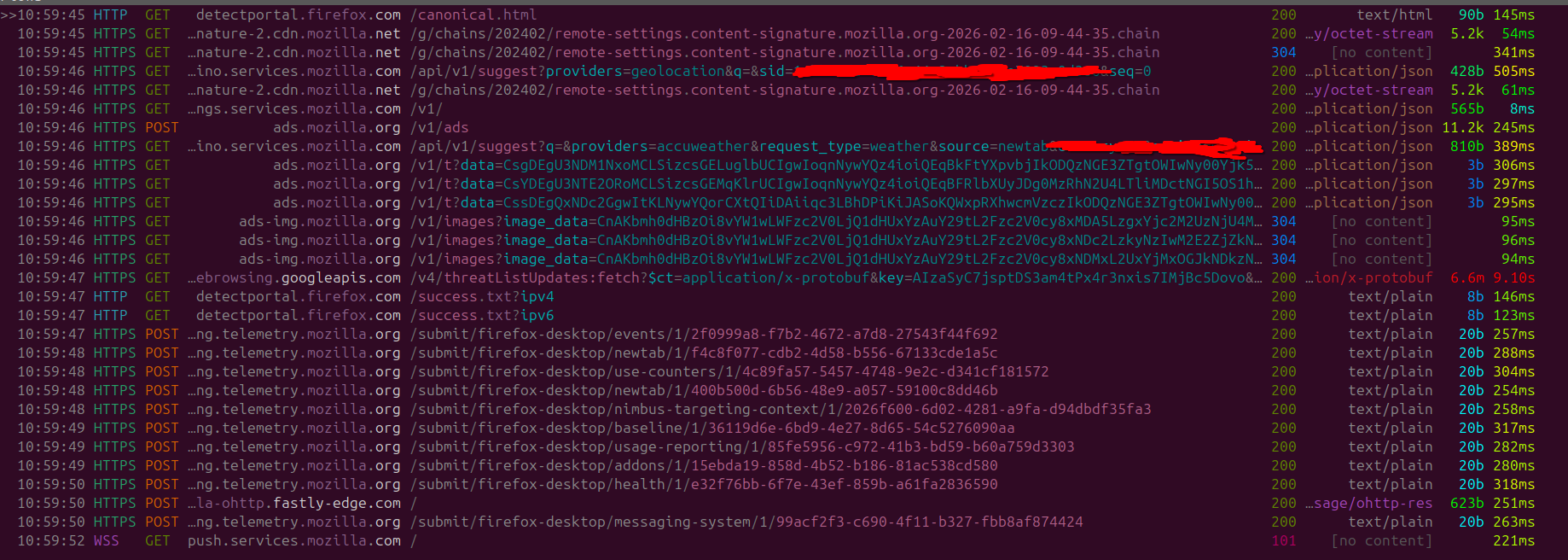
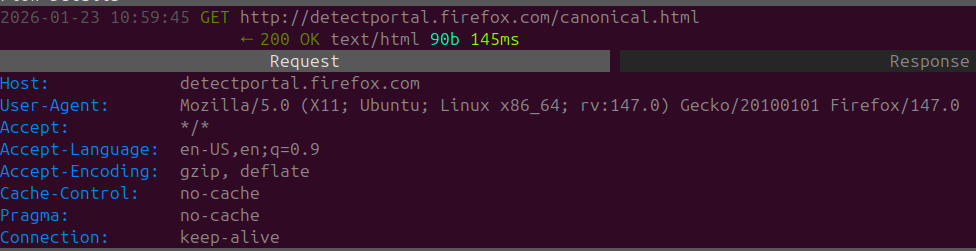
Upon startup Firefox sends a GET request to detectportal.firefox.com. This is used to check for both network connectivity and if their is a connection portal being used depends on a Captive Portal. There is no way to opt out of this. Captive Portals & Public Networks carry their own range of RISK please be vigilant and try to avoid using them if possible.
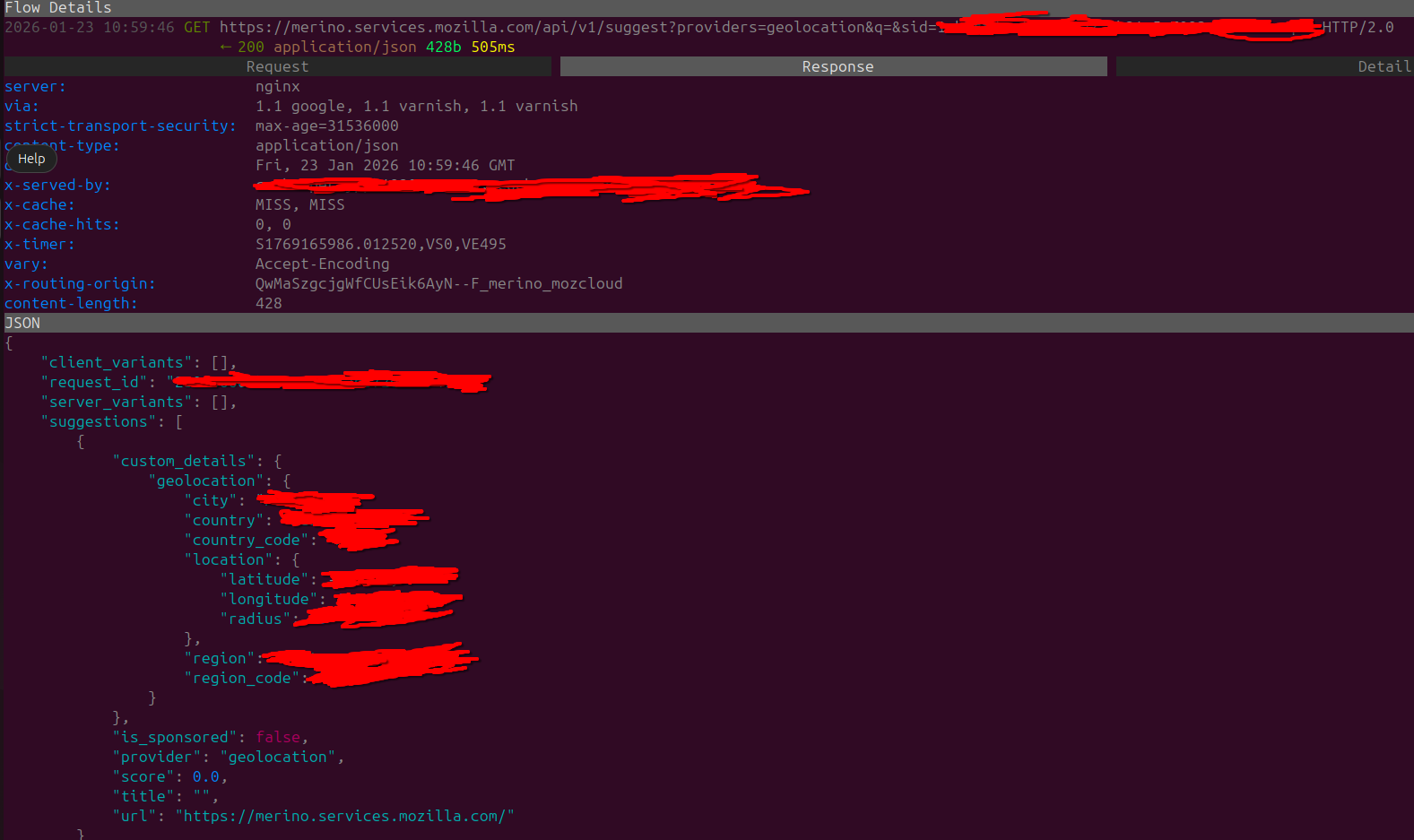
There's also have a GET request to merino.services.mozilla.com, which then tries to GeoLocate the user based off their current IP Address. Looking at the response based off our IP Address firefox has identified the following:
- City
- Country
- Country Code
- Location (LAT & LONG) + Radius
- Region
- Region Code
As per Mozilla's documentation Merina "is a service that provides address bar suggestions and curated recommendations to Firefox". The content itself might come from third-party providers and it is also used as a privacy preserving buffer.
In my opinion an option like this shouldn't be enabled by default and definitely should not be running for users who are starting up Firefox for the first time.
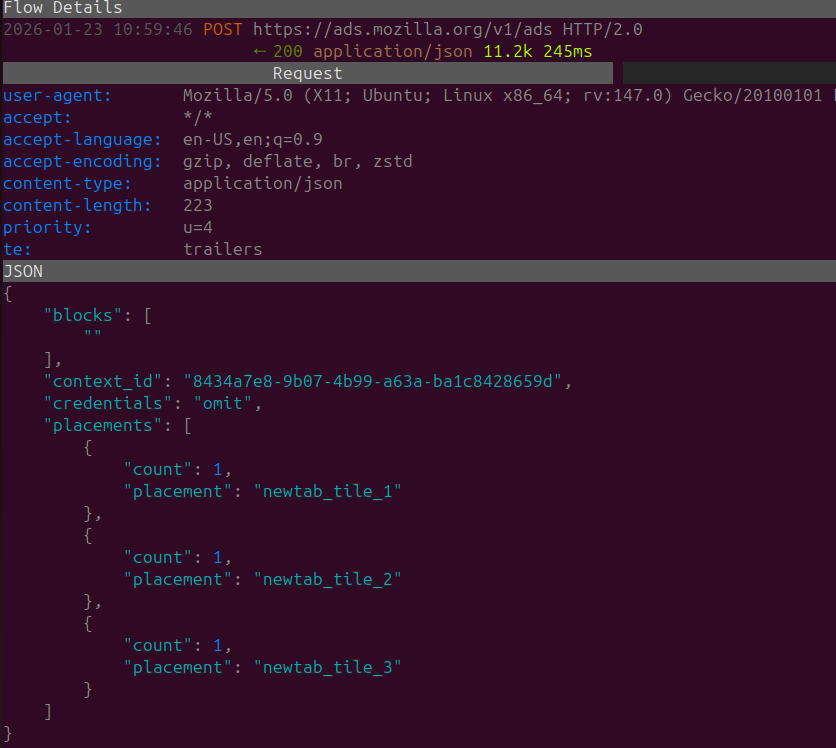
Continuing further down the line we can see another POST request that is sent to 'ads.mozilla.org/v1/ads'.
Within the body of the POST request we can see a context ID, and some info under placements for our tab titles. I believe it's signifying attempting to set up a sponsored add on newtab 1,2 & 3.
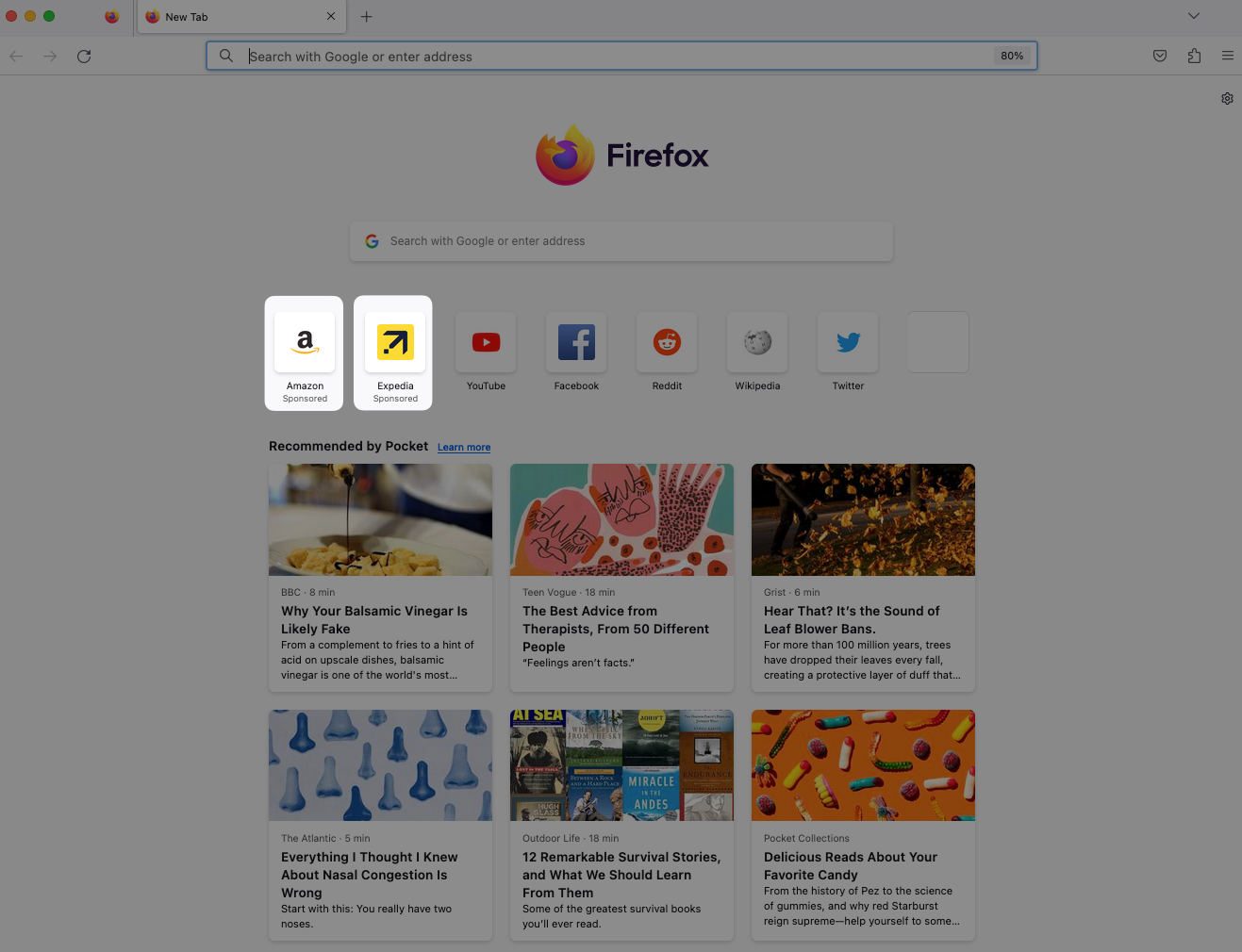
Using our IP Address the response links to multiple advertisers such as Amazon, AliExpress, FlightScanner. Obviously the advertiser selection might be configured to match your preferences and local area. All the URLS having referral parameters enclosed within the URL easily allowing the advertiser to collect and monitor the amount of people being refereed to their service via FireFox. (It can also be used for other things : ))
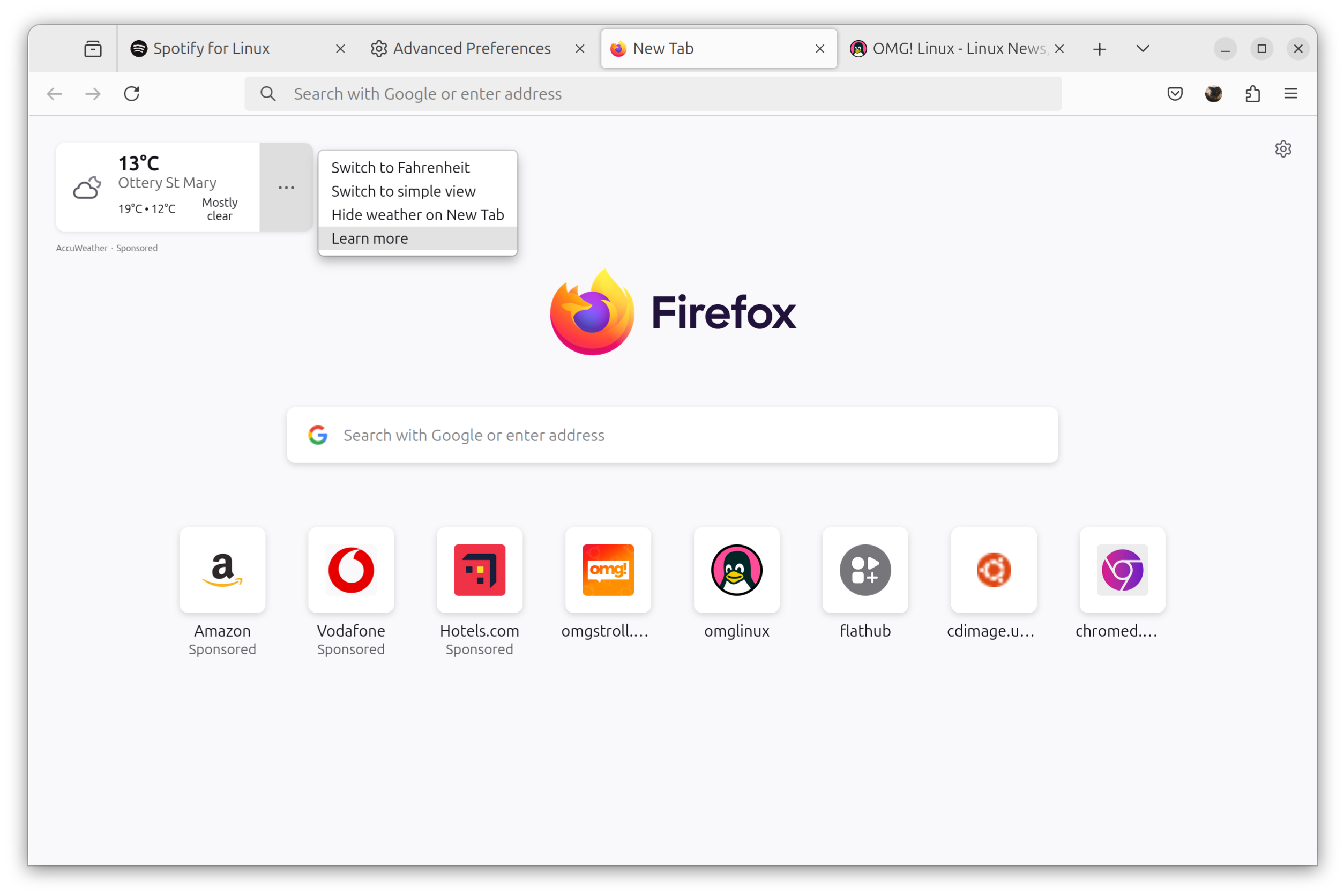
Another request is conducted with our location details being provided to the merino weather service.
And as a response generic weather data of the end-users local area is supplied basically just the weather forecast widget and links/references to the source of the weather forecast
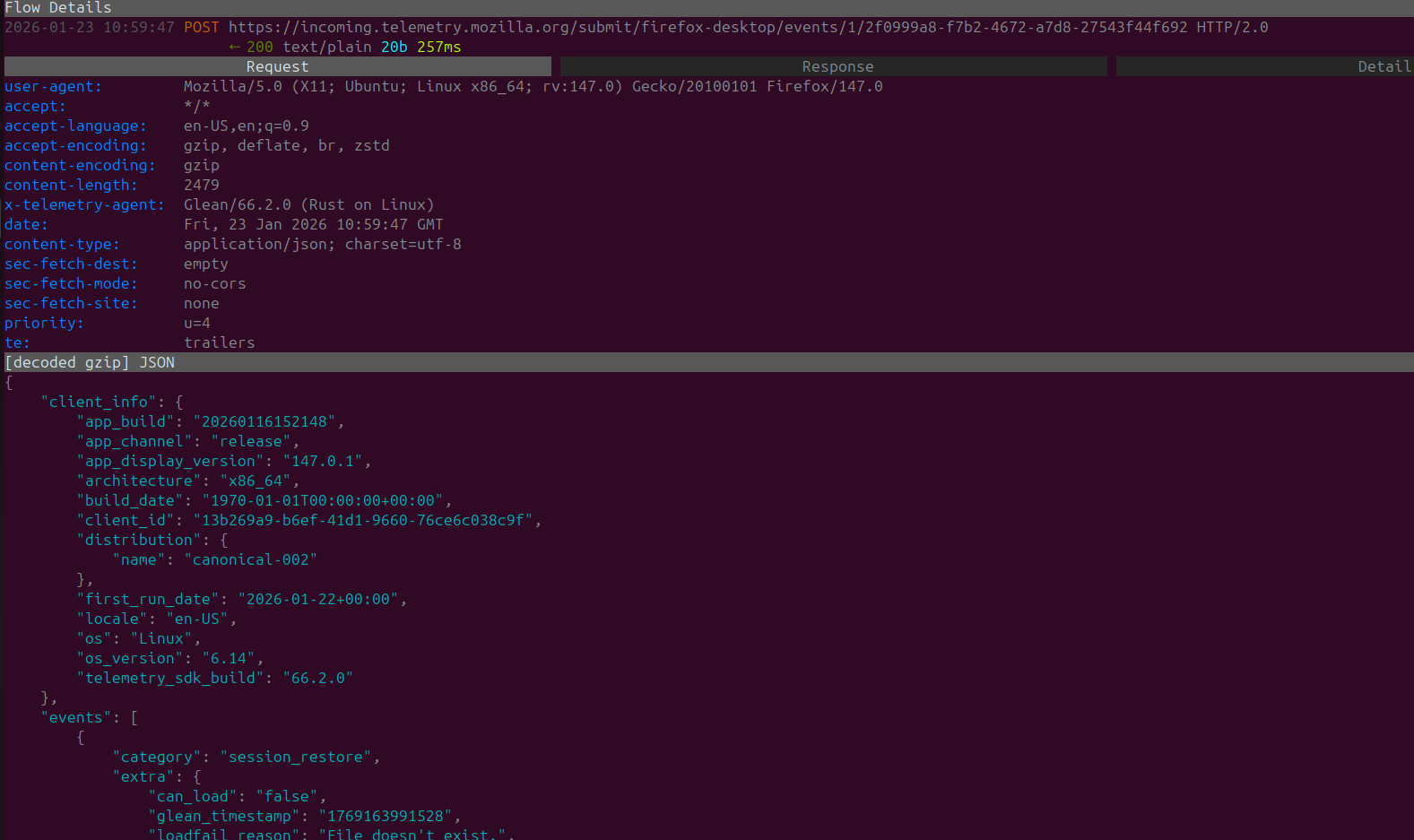
Well enough about the widgets and advertiser data we need some OS fingerprinting luckily the next request to 'incoming.telemtry.mozilla.org' did just that. With a fingerprint of my VM's operating system details, locale, CPU architecture ETC
Telemetry settings can be easily disabled however it's a bit pointless if upon a new-users first launch of Firefox all of this data is immediately sent to Mozilla.
Following the fingerprinting of my VM, we get a large stream of POST requests SENT which cover the following range
- Events
- Tab details
- Nimbus Targeting Context (Nimbus is Mozilla's automated experimentation system)

Essentially, while just opening the browser and not EVEN navigating to any page or URL Mozilla has already conducted the following actions and stored the following data
- Stored IP & Location Data
- Stored data regarding local Config / Settings
- Fingerprinted the HOST device and sent it to Mozilla
- Stored/Promoted data from Advertisers
Tab Behavior Firefox
Well after shifting through the "launch" behavior of FireFox it's time to mix things up and try to see if there are any abnormal activities once we open up a new tab
However the second a new tab is opened three HTTPS GET requests are sent to ads.mozilla.org

The request body in all three requests is filled with Base64 Encoded Content.
Decoding the Base64 Content I can see a request content includes data regarding Temu
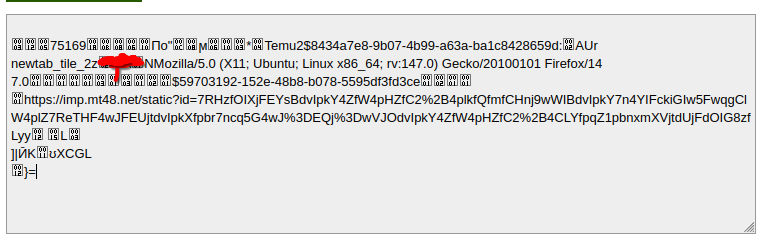
This is due to the fact that every new tab has "advertisers/sponsors" displaying on the page, so unfortunately every time you are opening a new tab data is being sent to Mozilla.
Other than that I was able to record any other network activity from Firefox regarding tabs/tab management.
Standby Requests Firefox
The next stage for us is to leave Firefox on standby. When I say standby I mean leave it idle for an approximate 30 minute duration.
After doing though having a skim through the network traffic we can see that the following requests were made:
- Weather
- Advertisement
- Threat-list
- Different bucket collection updates

The bucket collection updates, seem to point to different services, one of them is going to a Mozilla Remote Settings, it basically delivers config/allow-list changes dynamically.
Upon opening FireFox (As it was previously minimized). A few more network requests were sent to Mozilla.

Not to re-state the obvious but it seems that the network requests involved more OS fingerprinting, some "usage-reporting" that previously showed up after tabbing back in, which easily indicates that by default Mozilla calculates if FireFox is being actively used or if its minimized.
As per normal more advertiser data is also deployed out, because god forbid letting an end-user applying a single action on their browser without using it as advertiser data.
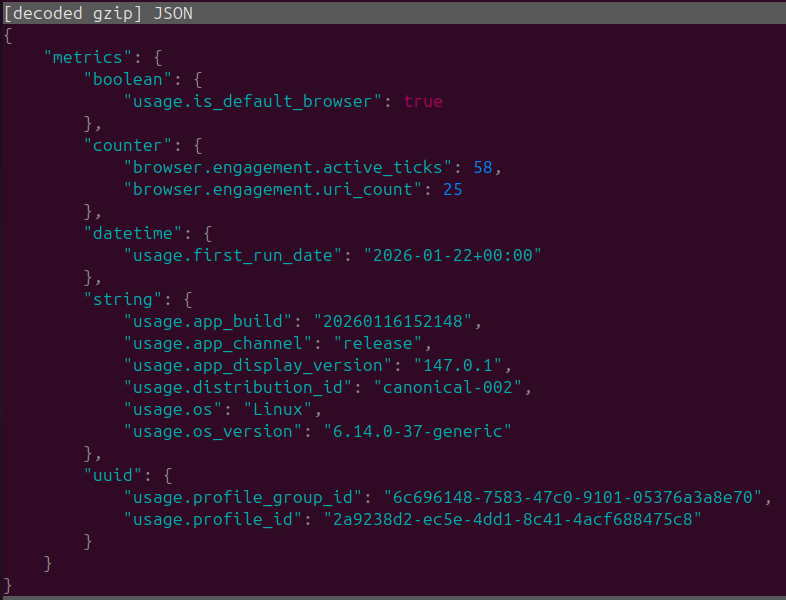
Upon inspecting the usage details we can also have a look at a bunch of metrics, including our active ticks, whether FireFox is our default browser, OS ETC.
In-case you are curious active_ticks is a probe specified by FireFox once in every 5 second-window in which a user preforms an interaction with content (Including mousing over the window while it lacks focus) as per the Mozilla Telemetry Documentation
Behavior after opting out of everything
To give FireFox a fair chance I will manually opt out of all the "optional telemetry" this also includes any weather / diagnostic options within Firefox settings we left with the following after launch.
I think it would be extremely beneficial for everyone (But Mozilla's Data & Marketing Departments) if this was the default configuration
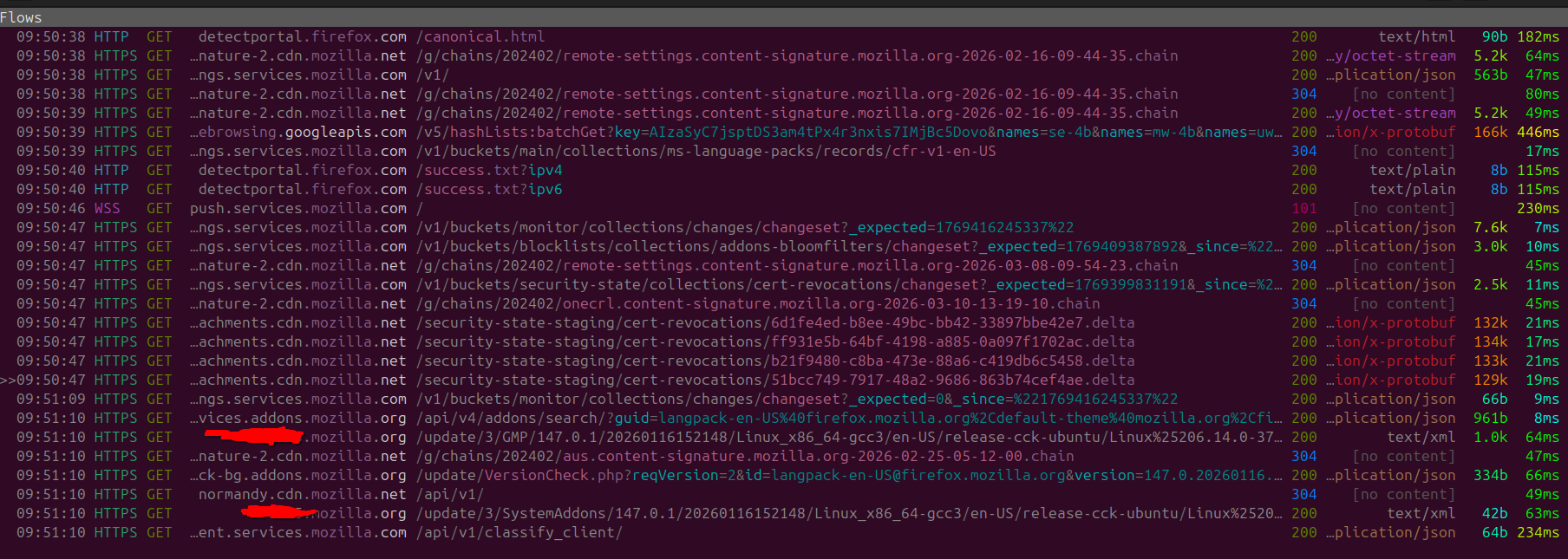
Looking at the requests we can tell that it's MUCH cleaner and with no POST requests sent out. Unfortunately connectivity checks are still occurring, with our IP Address and User Agent, still being supplied to Mozilla. (As-well as as the occasional push services request), but at that point it's just part of the core functionality offered by FireFox.

Note that even without the telemetry enabled, Firefox is still able to pinpoint OS & IP Details, so even with the hardened settings on base FireFox a lot of data is still being supplied to Mozilla, making FireFox not an optimal option for a purely private browsing experience.
Below screenshot shows evidence of this, as I left Firefox on standby again and had a look at all the HTTP requests were issued out.
Chrome
Google Chrome, well where to begin. It's the most popular browser that holds a 66.449% of the browser market share as per the 2025 Q3 report by Cloud Flare.
Google Chrome is a fork from the Google's open-source web browser, known as Chromium. Google Chrome itself integrates with your Google Account allowing you to sync bookmarks,history and passwords.
After installing a fresh Chrome instance on the Ubuntu test machine and routing the traffic through our proxy, we can start inspecting the network requests that Chrome is sending upon launch. Surely there won't be any issues right?
Well at-least in-comparison to FireFox by default Chrome seems to submit less total network requests upon launch. However you can see some weird oddities from Chrome including a random TCP call from port 38440 to mtalk.google.com:5228
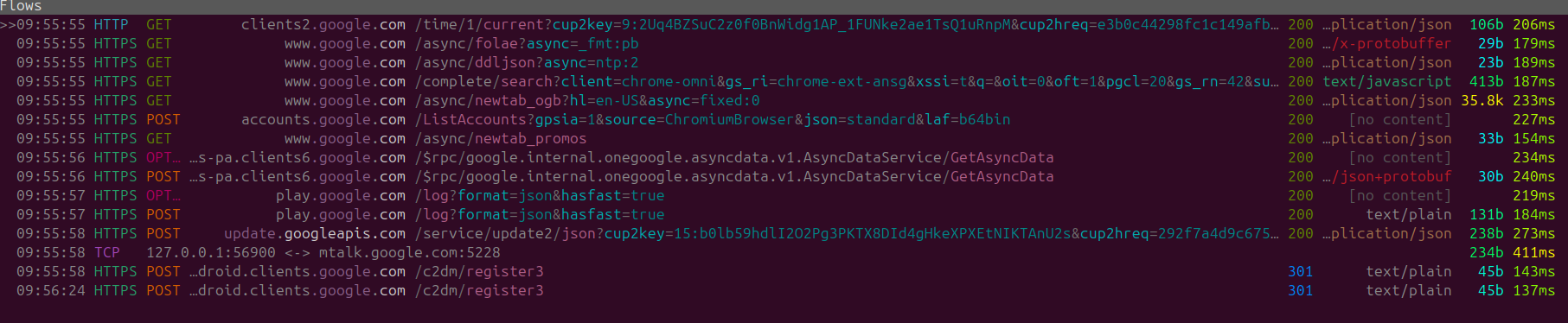
Well what is mtalk.google.com:5228 you may wonder? Well on the service what it seems to be is a service that has been discontinued by google. It used to be actively used by Google's legacy messaging and VOIP services (Google Talk).

The Google Talk web-app has been discontinued over 10 years ago for some reason there is still active network activity every-time you launch and use Chrome. This might be a case of forgotten cleanup, or the call is so ingrained into the Chromium browser that is hard to remove, but regardless it is an unnecessary network call that is being made for no reason.
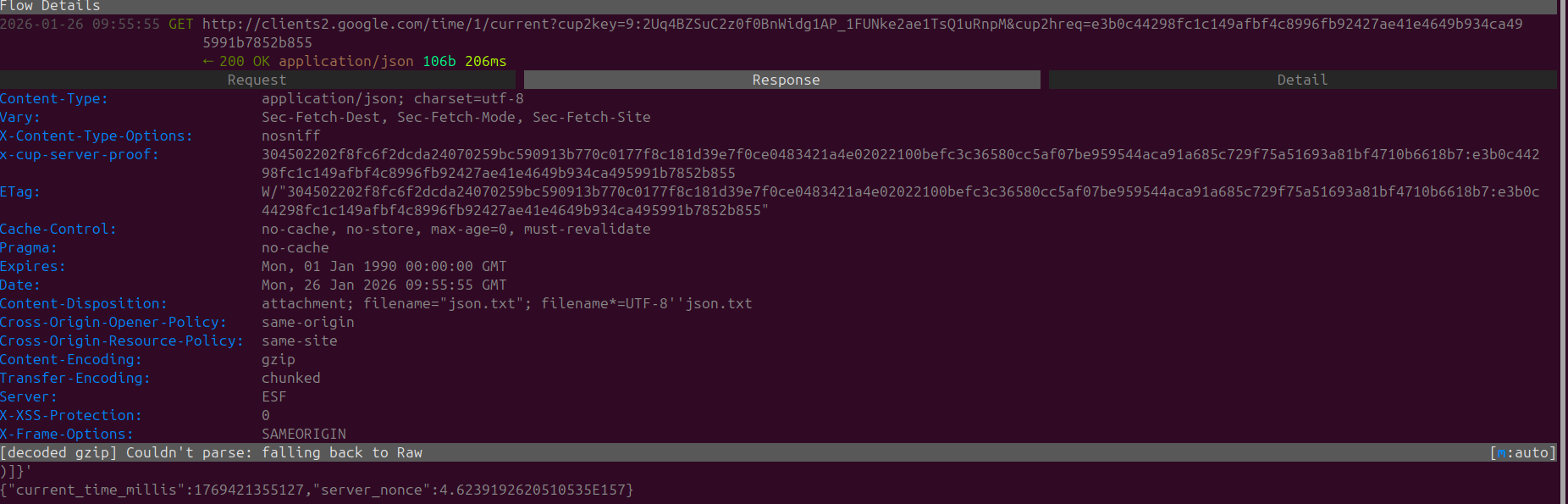
After that initial tangent looking closer at the initial batch of HTTPS requests we don't really see too much, there are some observable connection to clients2.google.com as a connectivity test.
The sub-domain itself seems to be used for background tasks, data synchronization ETC. Looking at general post history by users, we can see that if end-users block requests to clients1.google.com they noticed issues with search suggestions.
There are other posts that also mention that when blocking requests to clients4.google.com issues seem to arise chrome synchronization services for both passwords and bookmarks
As clients2.google.com is initiated upon launch it would point to being a service that is used for an update check, most likely for any extensions installed on Chrome. However even without any updates or extensions the end-point is pinged by default.
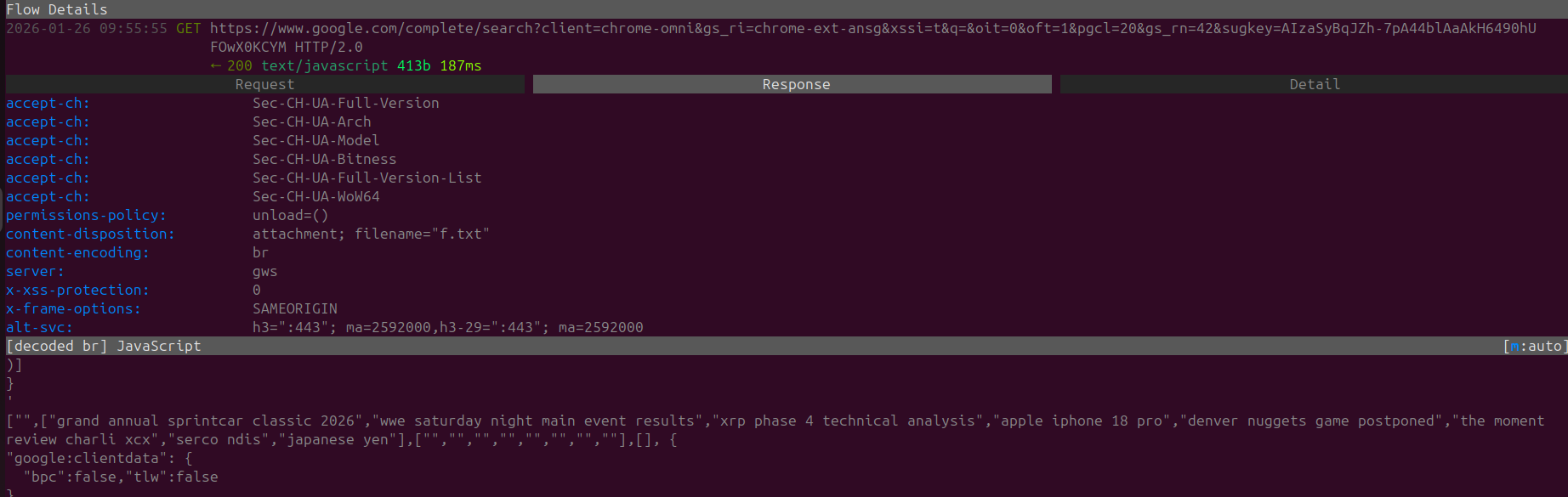
Another non-interesting request with article headers as the response. This is likely due to the page that opens when up when chrome is started up.
It's kind of poetic, that upon just launching a browser you're immediately directed to attention grabbing headlines and posts. It's like attracting a moth to a flame.
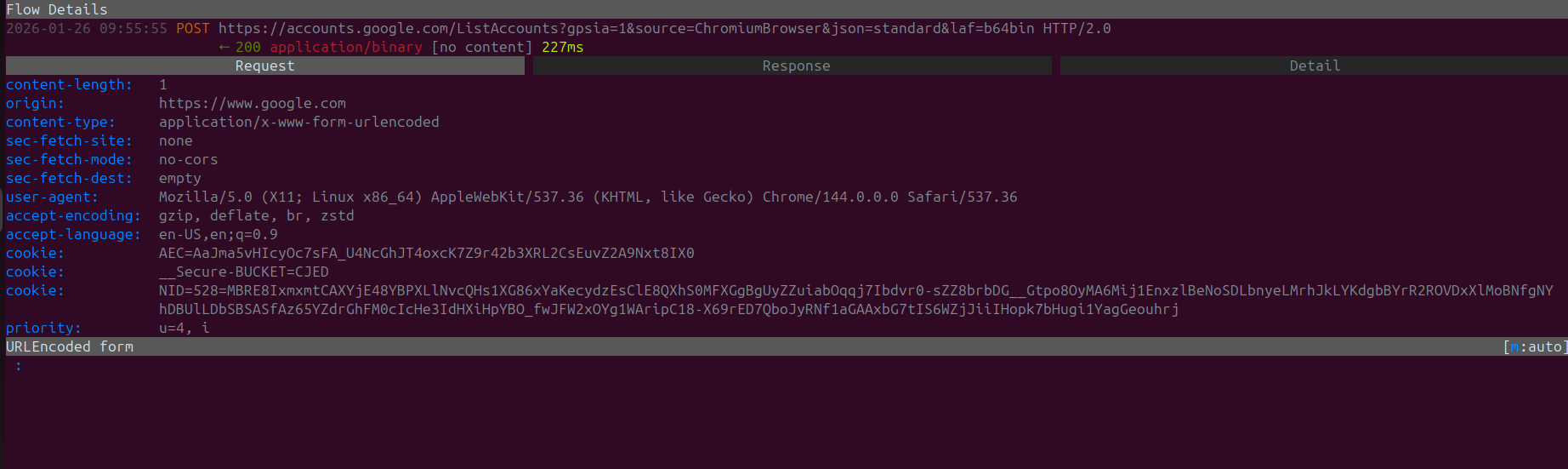
A POST request is also observable to 'accounts.google.com/ListAccounts' attempting to list all google accounts connected to the browser. At this point I can say that it's a given as Google Chrome it's not for privacy but convenience for users are entangled with the Google suite.
Although again network activities like this should NOT be the default enforced standard on Chrome upon launch.
The requests, after includes a GET request that is loading promotions (Standard with any new tab) and some POST request to clients6.google.com which as previously discussed is a part of Googles endpoints for Chrome Sync.
We can also see a POST request that is sent out to play.google.com (Googles App Store) with a request header called "sec-ch-ua-platform" with the value of "Linux" attached, so for some reason when launching Chrome on STARTUP we are being redirected to a Linux Google Play Instance.
Obviously the way they identified the header being installed, would be due to either
- The fact that we installed the "linux" version of chrome
- The insane amount of network requests that send data to Chrome
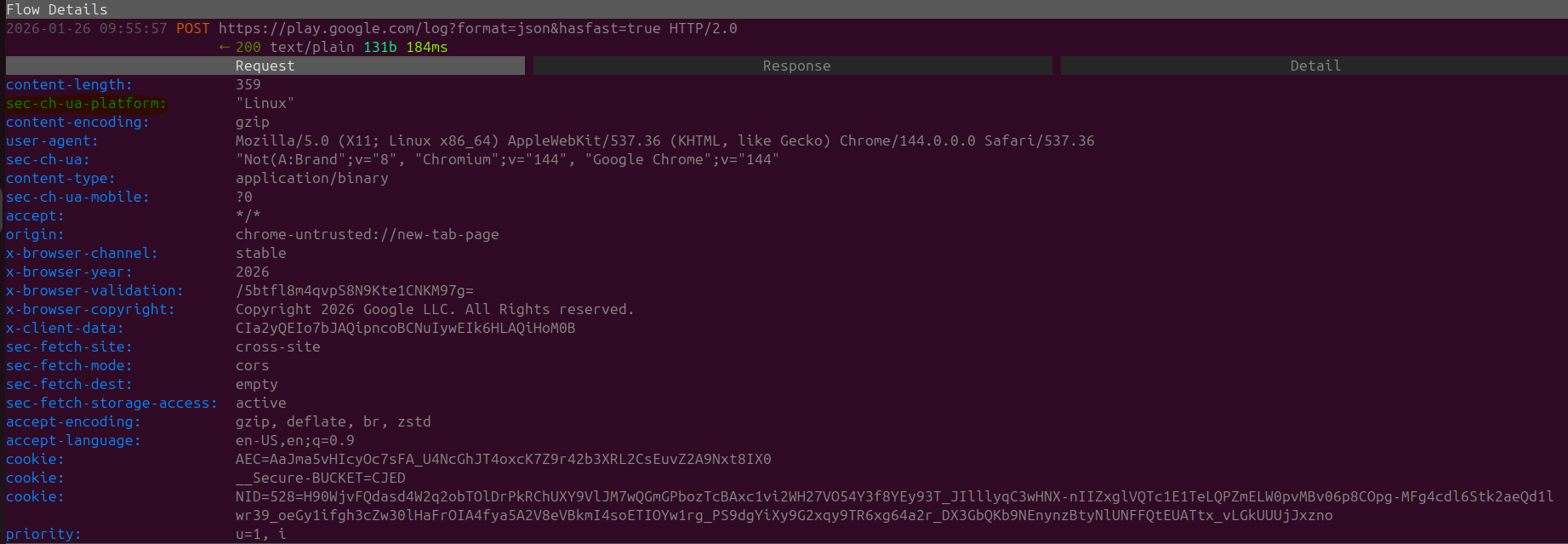
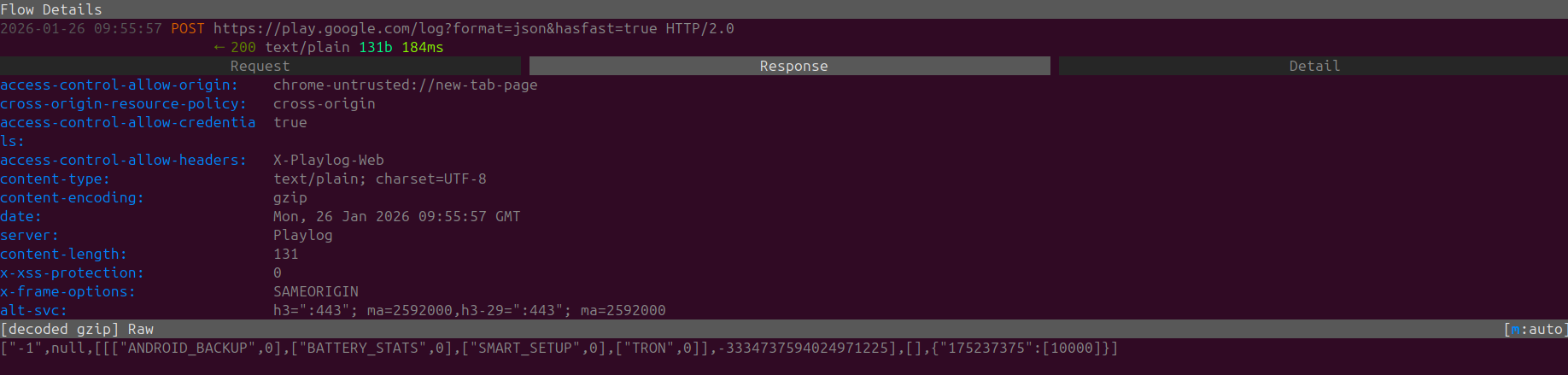
Regardless what's more peculiar rather than only sending a network request to the GooglePlayStore there is also a weird response.
Within the included Response we can see mentions of ANDRIOD_BACKUP, BATTERY_STATS,SMART_SETUP and TRON
Quite strange that a desktop browser would be attempting to communicate to this end-point. It's also quite funny to see the blatant data that is being tracked from Google Play Services on Andriod Phones, especially the Battery Stats that are actively collected and monitored.
A portion of these battery stats can can be accessed Andriod applications through the Andriod API which is why companies like Uber are being accused of using this data to price gouge their end-users.
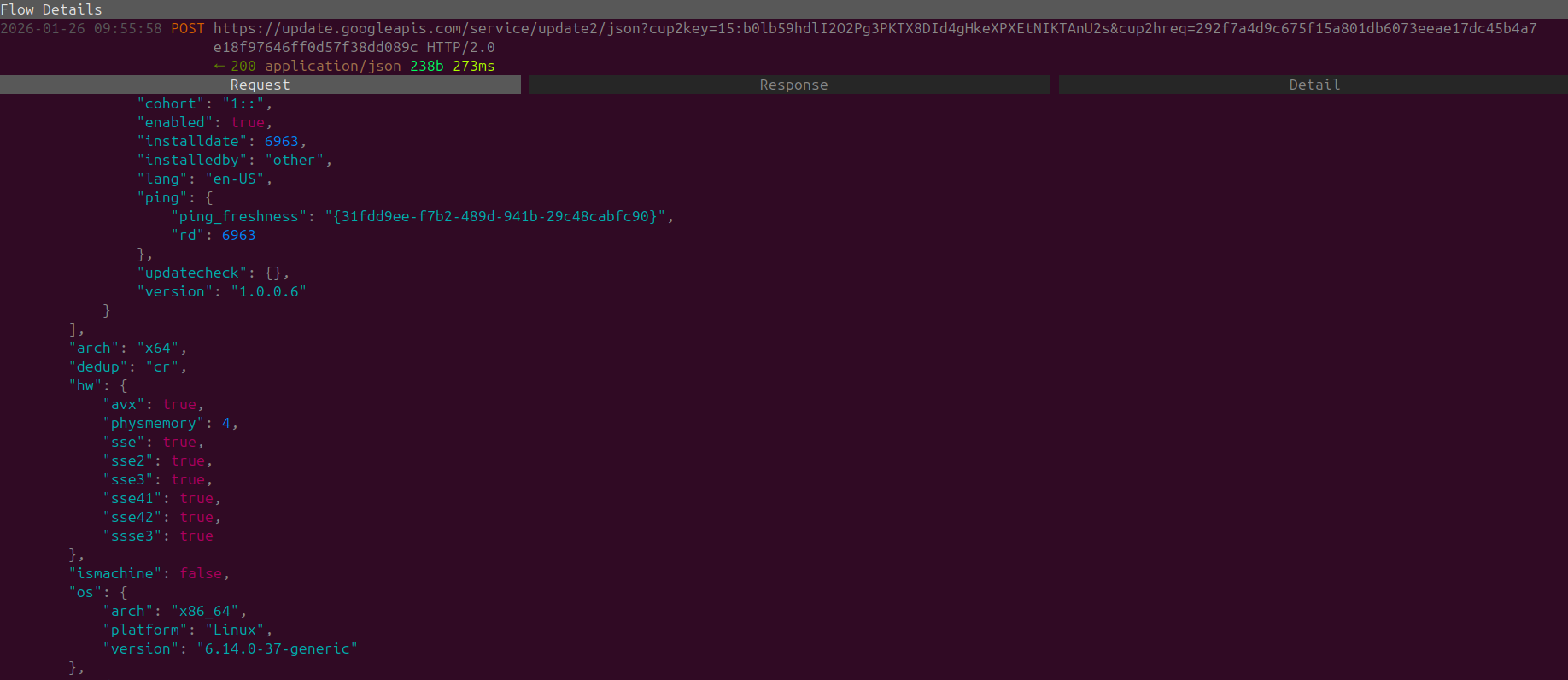
In case you were severely worried that Google didn't grab enough of your data, we can also find a POST request that is requesting a hardware update so this provides further details of the HOST including hardware details, so in-case you upgrade your device Google will also be updated as they care about you very much.
Random Update Stream
While observing Chrome, I actually encountered a browser auto-update. For all the mainstream browsers this is common, however I will use this as a moment to preach that in terms of data privacy, it's always better to be aware of when packages are being updated.
This is the benefit of Package Managers that allow you to install applications, manage when you update them, and see what's being updated within the actual application.
Browsers such as Google Chrome automate this through application auto-updates, rather than notifying the user to initiate the update.
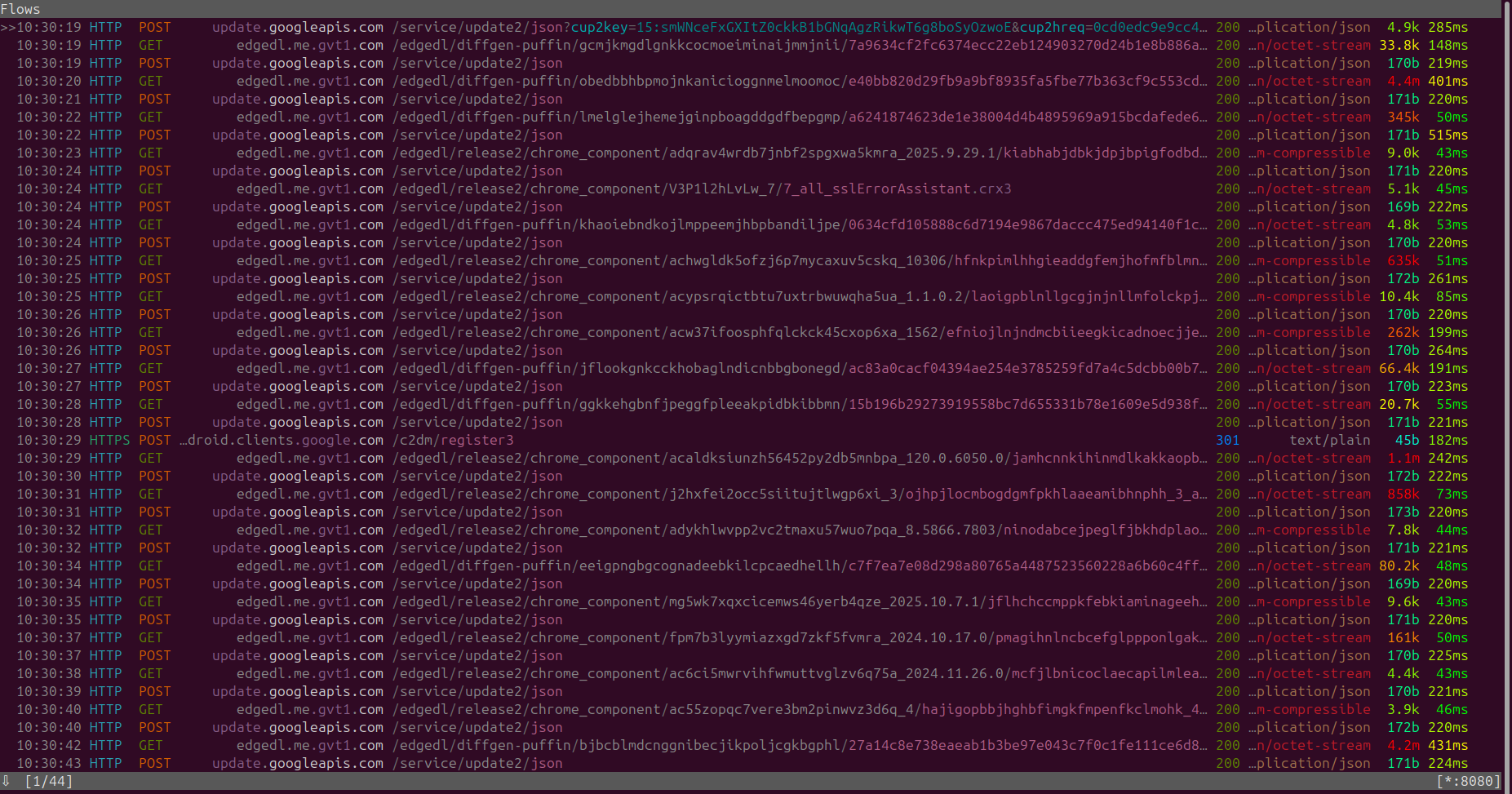
Standby Requests Chrome
We've previously left Firefox on standby, I applied the same practice to Google Chrome and left it idling for a bit

During standby we have a generic GET request that re-states what Google Chrome already knows and that is our device operating system. This is in-case we do a cheeky OS-Swap randomly or if we attempt to access Google Chrome via a different device (With IP's or Google Account it would be very easy to correlate both of the devices together).
HTTP POST requests to clientservices.googleapis to an UMA endpoint which would most commonly stand for User Metric Analysis.
I didn't attempt to pinpoint the contents of the hex stream, so in this we are unable to verify what is being collected, however it is likely similar to what Firefox collected IE how much time was the application spent idle/minimized, browsing actions, config changes ETC.
Tab Behavior Chrome
There was a lot of optimism from my side, as I hoped there wouldn't be a single request that Chrome makes when I open a new tab. Alas I was a fool while opening multiple tabs multiple GET requests are instantly completed, loading new tab promos and content, and a timesync (NTP) request.
Opening new tab:

As seen above, this occurs every time you open a new tab on Chrome. Some end-users might wonder how Google Chrome consumes so much RAM, I think it's safe to say if the act of simply opens a tab generates a lot of back-end network requests to Google I wouldn't dare imagine what could potentially be updated on the application level.
Behavior After Opting Out Of Everything Chrome
Even after disabling Chrome protection settings and opting out of multiple services, the amount of traffic Chrome is collecting doesn't decrease.
Surprisingly this allowed me to easily figure out that most of these HTTP network requests are being generated due to the navigating to Google. So it's clear that Google is the problem, and if you are using other web-browsers and defaulting to Google as the search-engine then this level of data collection might be occurring with you

DuckDuckGo + Chrome + Optimized Settings
Due to the fact that a large amount of Google Chrome's initial launch traffic was due to Google I wanted to give Chrome the benefit of the doubt, by attempting to change the default browser to see if upon launch traffic is reduced.
With no surprise whatsoever when switching the primary search engine to DuckDuckGo upon launch we can observe WAY less traffic then before, however the actual application behavior causes Chrome to contact accounts.google.com and android.clients.google.com, alongside the traffic that is being sent to mtak.google.com on port 5228.

Just a side note that even with the optimised setting we can still observe the same amount of traffic being sent to Google to the same endpoints. So regardless of whatever action you take with Chrome your data will always be leaked (From the application side at-least I haven't researched if there are any config files that let you override this).
Overall the requests are the same UMA /Google Talk requests.

Proxy Flagged
Funnily enough while I was idling and writing this very post I noticed some new requests that were never previously generated I decided to have a deeper look as I didn't recognize the domain.

To confirm the domain owner, I did a whois search as it didn't seem to be a standard Google domain.
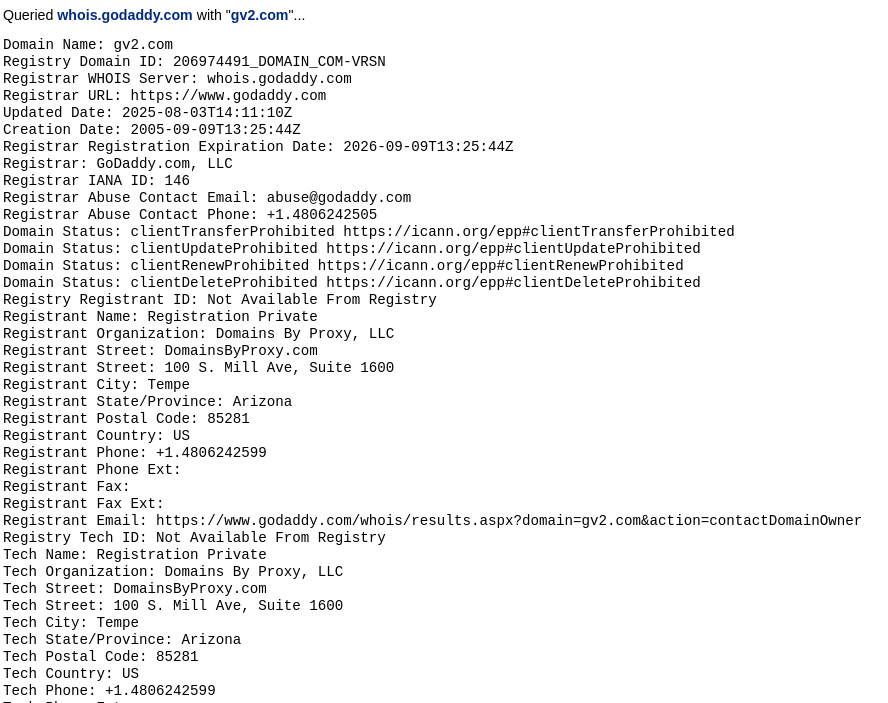
The whois database doesn't provide us the contact details of the current registrant as it was done via a proxy service.
After doing a little bit of research I found a Reddit comment from 8 years ago with an extract of a whois search to that same domain
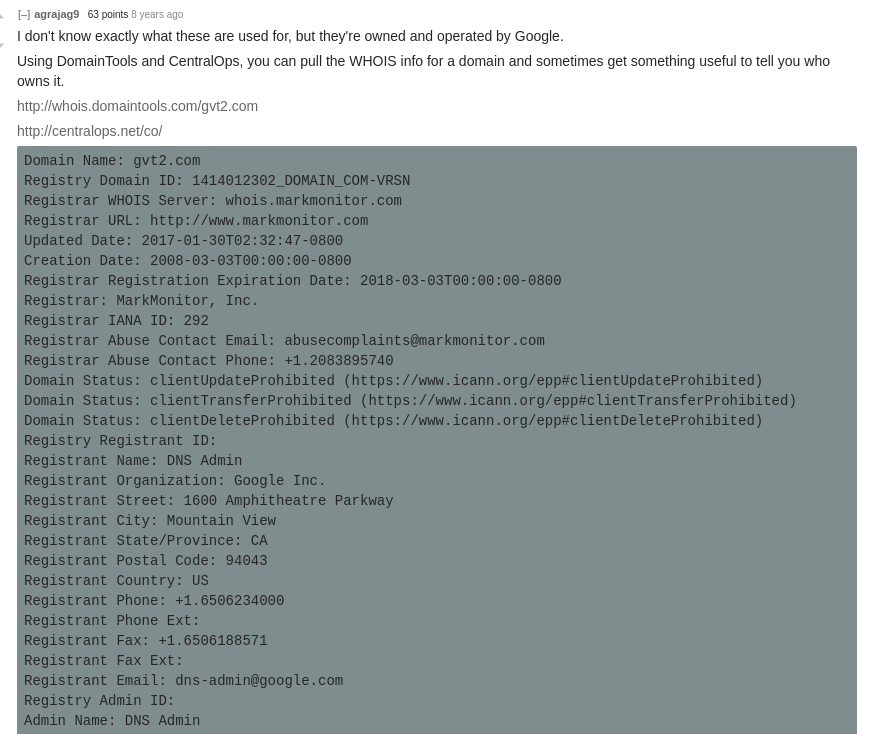
We can see that the domain was previously a Google owned domain. Judging by the fact that Chrome is still making POST requests to it, assumes that there is a level of affiliation still between Google and the gvt2.com domain
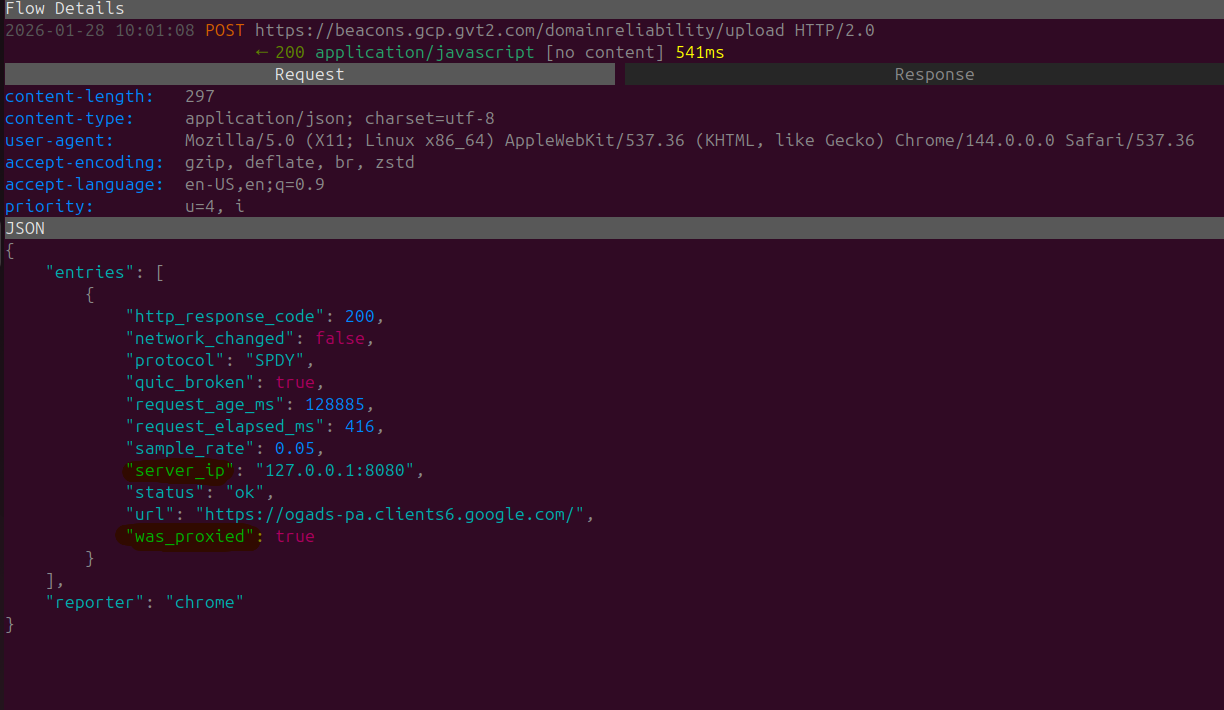
Upon examining the request further looking at the data provided in our POST request I can see that the parameters of server_ip and was_proxied is enclosed within the body.
Notifying the current owner of the domain that I have a proxy configured and where it is hosted locally (Jeez).
Chromium (Google)
Chromium is the free and open-source web browser project that is developed and maintained by Google. Chromium is what other browsers such as Brave & Opear/Opera GX use
On startup we are hit with the same traffic & standby requests which is caused due to Google.com
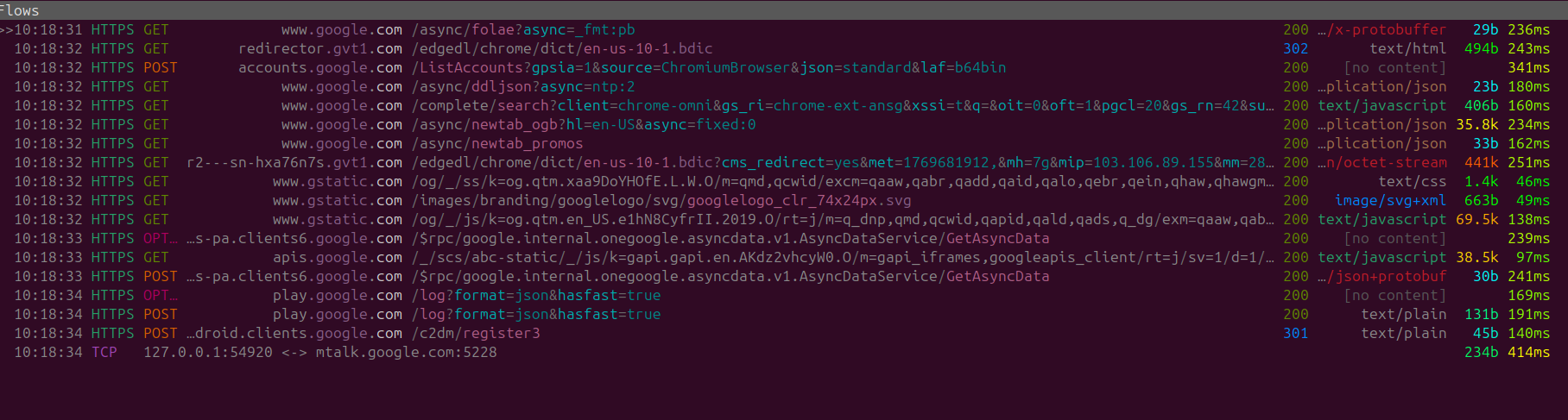
Chromium + DuckDuckGo
The results seem to be the exact same thing with network connection requests mtalk.google.com nd android.clients.google.com

During standby similar network traffic is observed.

Basically in terms of data privacy there doesn't seem to be any real benefit to using Chromium, as it seems to be communicating the same amount of traffic on the network layer as regular Google Chrome. However the application side would be less bloated and Chromium would be eating up less memory per tab.
mtalk.google.com Rabbit Hole
So I was curious and decided to clone the chromium repo in order to see what was happening with the mtalk.google.com network calls, as Google Talk is no longer functioning surely there would be a use-case for it otherwise why is it still int he code???
Doing a search on the domain name in the 50GB+ repo we find the following mentions to mtalk.google.com
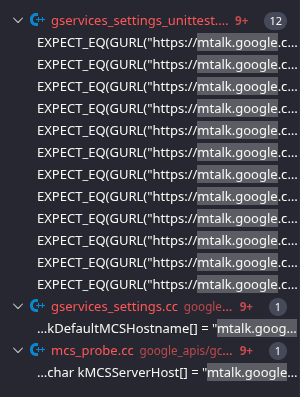
To be honest the only file of interest that I've found is gservices_settings.cc, the other two folders gservices_settings_unittest.cc & mcs_probe.cc are both respectively a unit testing file and a standalone tool, that don't seem to be actively used in the application itself.
Looking at gservices_settings.cc, we can see that mtalk.google.com is defined and stored as the following variable kDefaultMCSHostname which is also mapped to mcs_hostname.
This method GetMCSMainEndPoint strikes me as the primary usage for our mtalk.google.com domain, in which GURL is building a canonized URL and returning it (So 'mtalk.google.com:5228')
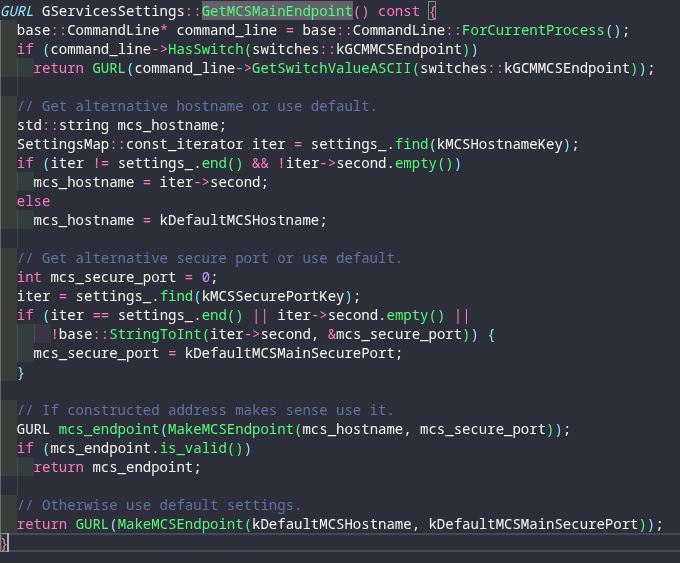
This is then used by the InitizalizeMCSClient class (There is a direct object link between gservices_settings_ and GServicesSettings)
InitializeMCSClient() is a method that gets called, after 3 other methods are called basically starting the GCMClientImpl.
From there we can see that is attached to the vector variable endpoints, and pushed back (Value is added to the end of the container).

The full function seems to indicate that GetMCSMainEndpoint() is being imported to endpoints which then gets built into an object as apart of connection factory, we can see on the bottom it is then eventually used to construct the mcs_client_ object and then initialized.
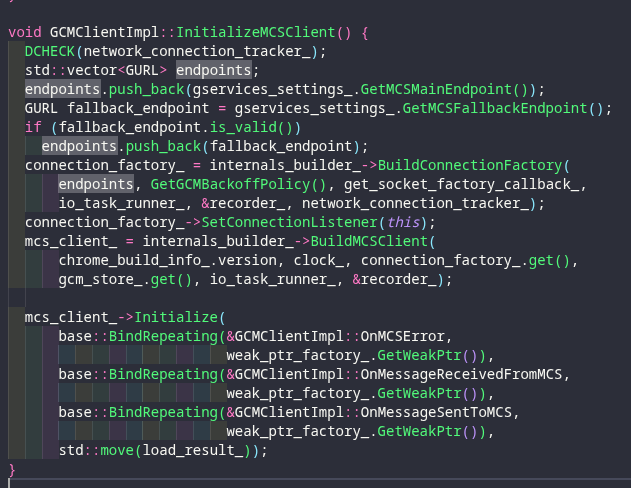
This is then started via GCMClientImpl::Start
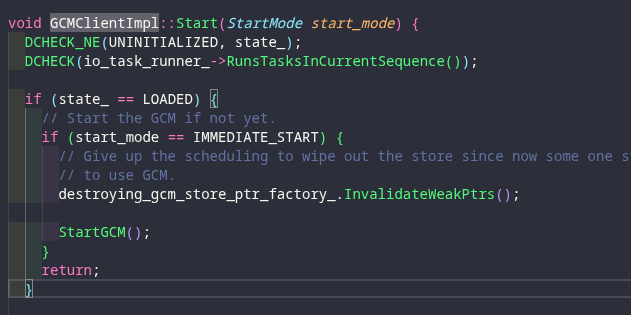
To be honest that's it from there I couldn't find anything else so it's either my lack of a Language Server making it impossible to find an instance of which it is called, or if this service is not being referenced by the code directly.
Unfortunately even after doing a bit of digging we couldn't find out what exactly mtalk.google is doing.
We have the clue of MCS which might infer Metrics Connectivity or Mobile Connectivity?
Looking at the Chromium Issues there have been multiple brief mentions of subdomain over the years, there are mentions that the port 5228 is used only for Google Play Services, so again this might just indicate an outdated mobile component inside the Chromium code.
Ungoogled Chromium
Ungoogled Chromium is a open-source fork of the Chromium Web Browser. Made with the sole purpose of removing all Google Integrations in chrome (Basically everything that was highlighted in the Chrome & Chromium Section directly above of here).
Upon launching, idling and standing by for a bit zero network requests were made by Chromium browser. The core of this blog post is me routing browser traffic on a VM through a MITMProxy and going through the network traffic manually.
With functionality like the Ungoogled Extension Store you are still able to procure ad-blocking extensions.
LibreWolf
LibreWolf is a Firefox fork that is configured with strict security settings (Cookie deletion, cert pinning ETC) and comes with a built in ad-blocker extension (Ublock pro) and DuckDuckGo as a default browser.
Upon startup we can see the following services, obviously as it is still a Firefox fork we can still see some GET requests being made to Mozilla, however they seem to be on the lighter side with a few GET requests.
The GET requests is basically directed to addons.mozilla for the extension Ublock pro.

Standby Behavior LibreWolf
No Traffic was directed through our Proxy, upon leaving an idle instance of LibreWolf running on the virtual machine.

Tab Behavior LibreWolf
Similar to the Standby Behavior no network traffic was routed through the proxy, while swapping through tabs.
Side Note
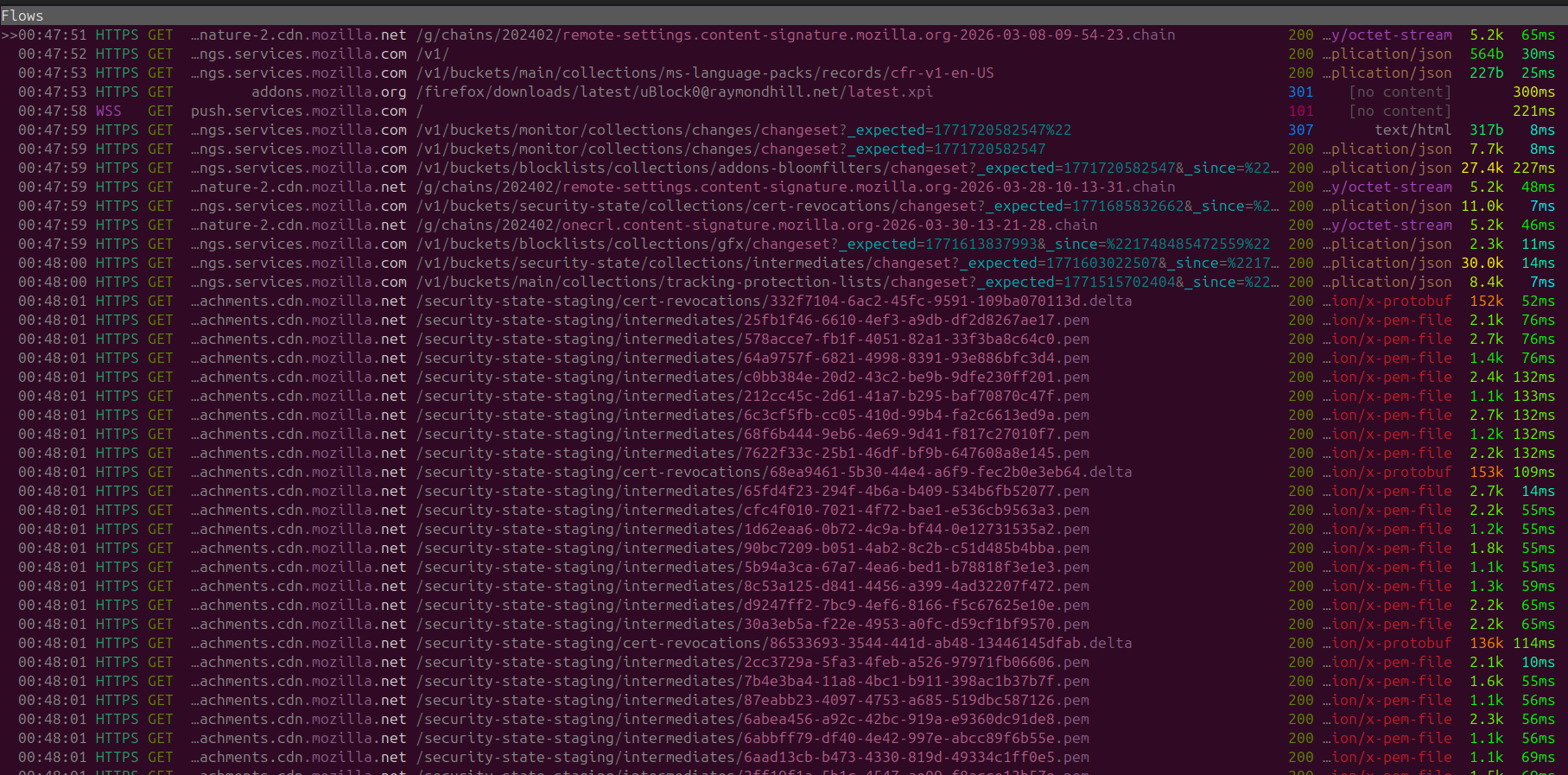
Upon one of my relaunch of Librewolf it seems like I was greeted with a mass update to my certificate store and protection lists, so another negative of this is that it seems to not be maintained through package updates from the developer but still managed and updated from Mozilla.
Pale Moon
Pale Moon is another free open-source browser that is based on Goanna (An open source layout and rendering engine) which is a fork of the Gecko engine from FireFox.
Pale Moon advertises itself as an efficient alternative to Chrome that respects your privacy and doesn't remove any features.
Upon launch the following network traffic is observed.
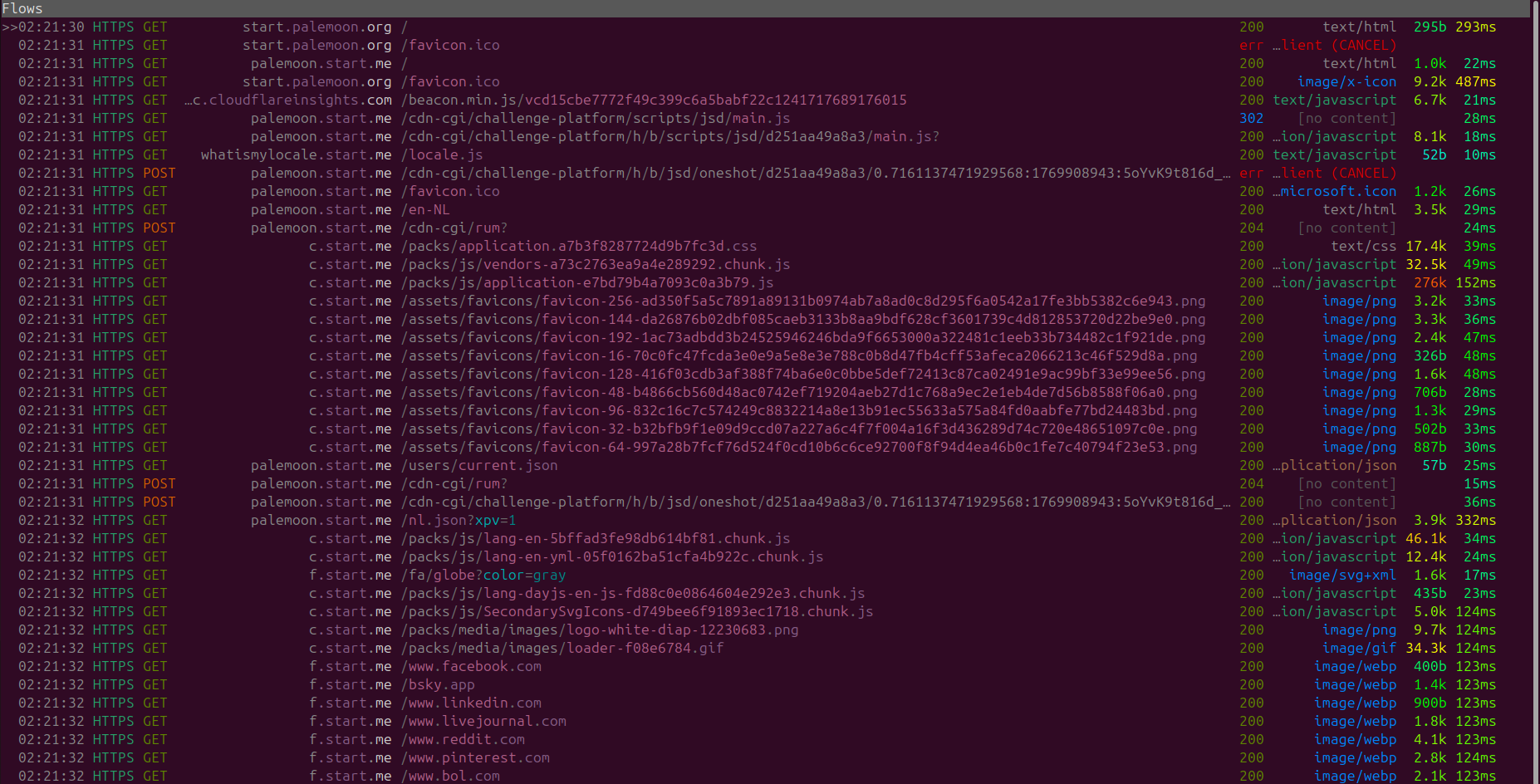
However a majority of these doesn't seem to be due to the browser itself it seems that this traffic is due to homepage being an external web application.
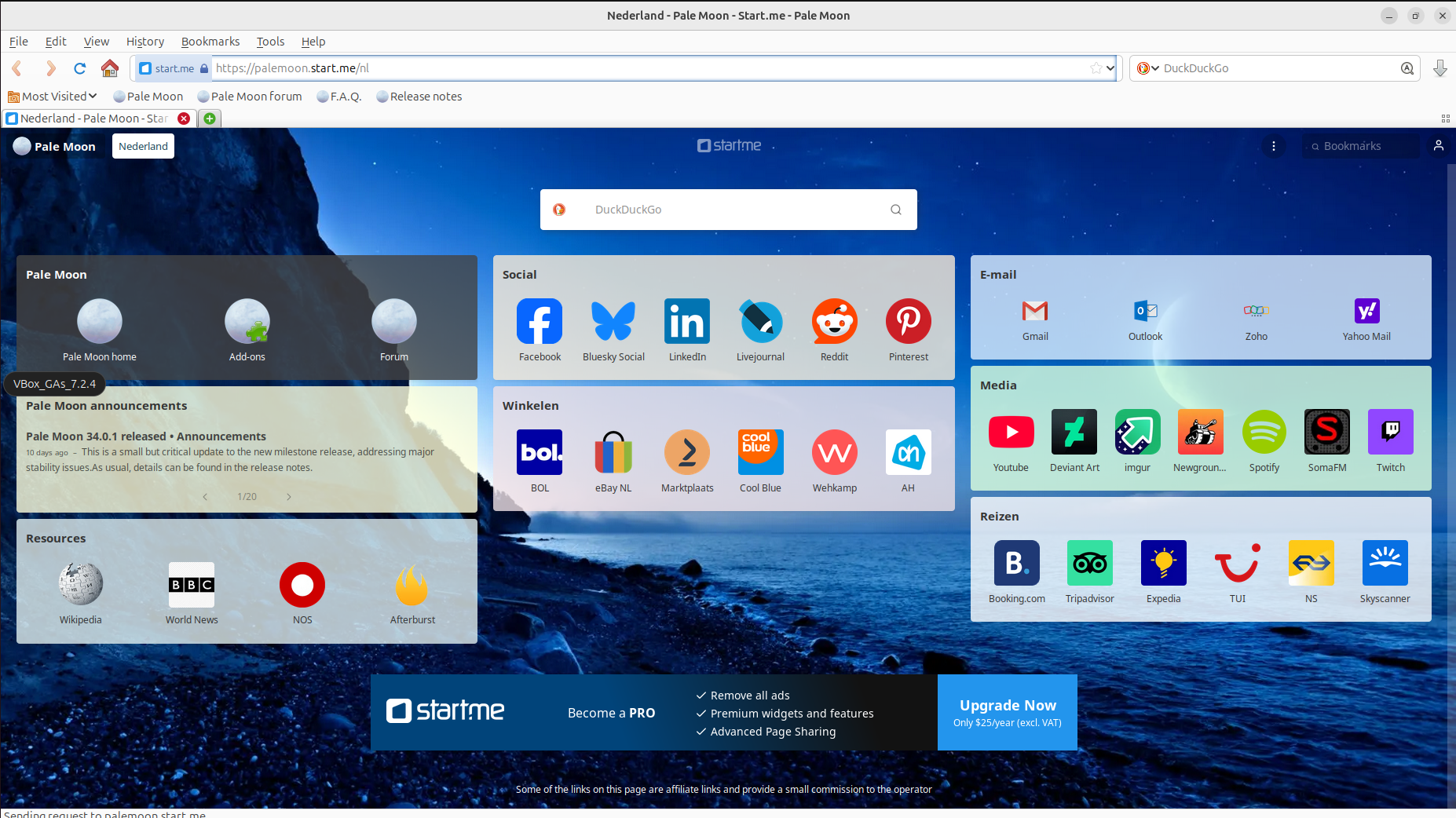
This can be easily adjusted and by modifying the homepage within Pale Moon settings, and make it open a "blank page" now we can measure the amount of traffic generated from the "browser" Palemoon.
In the end we can confirm that upon a standard day-to-day launch no network requests are generated from Pale Moon.
However upon a relaunch of Palemoon at a later date we did receive a singular GET request to update the block-list.

This is all specified in the Pale Moon's Privacy Policy , as-well as the fact that "You can turn off the above update and verification features, but that may leave you open to security vulnerabilities.".
Overall extremely solid browser.
Standby Behavior Pale Moon
No notice traffic after leaving Pale Moon on standby for hours.
Tab Behavior Pale Moon
Nothing notable between closing and opening new tabs.
In Conclusion
Now to wrap things up on this short and concise blog-post, the core of my discussion was to emphasize network traffic being generated from Web-Browsers in order to raise end-user awareness on the matter. As no end-users typically consider this.
The typical day-to-day end-user is usually more conscious on their ISP's spying on them and end up procuring VPN's. However for any applications they're installation without proper consideration of the developer/company they're choosing. that might not respect their right to privacy at all.
As the fight for data privacy becomes more and more difficult, with more online web-applications increasing the quantity of data grabbed from their users, leading us into a deeper and darker dystopian future. To avoid the worst-case scenario were every single person has fallen to this monstrous data algorithm everyone who uses the internet needs to fight for their data privacy.
Pay attention to what applications you are installing, put reasonable effort into learning the technologies/background of companies you interact with always opt to use open-source and decentralized applications.
Technology will continue evolving, peoples dependencies on the latest technological trends will increase, there will be less and less physical dependencies in the world. Don't blindly believe one source of truth for anything always keep an open mind and always try to find reasonable conclusions made by YOU.
Urm yeah in terms of browsers probably go for Pale-Moon or Ungoogled Chromium lol.